









Building a store23 October 20267 min read
Free gift over a minimum order value in Shopify: discount, automatic discount or custom logic

“Get a free sample from 50 euros”: promotions like this are quickly decided and, at first glance, quickly set up in Shopify. The catch only shows in the cart. This article explains what Shopify does out of the box, where the standard feature ends and when custom logic pays off. It is written for store owners without a technical background.
A note on scope
All statements about discounts come from the Shopify Help Center, as of October 2026. Menus and features change, so check your admin. I do not name prices for apps or development. Whether and how you may advertise promotions legally, for example with price statements, is a question for your lawyer.
Three ways to a free gift
- Discount code: the customer enters the code at checkout.
- Automatic discount: the discount applies as soon as the matching products are in the cart.
- Custom logic in the theme or through an app: the gift is put into the cart by code or by an app.
The first two ways belong to the standard feature “Buy X get Y”. You need the third when the standard feature does not do what you have in mind.
What Buy X get Y can do
According to the Shopify Help Center you define two things: what the customer buys (“Customer buys”) and what they get (“Customer gets”). In addition:
- Value of the gift: the items the customer gets can be free, or reduced by a percentage or an amount per item.
- Per order or per item: the discount can apply once per order or once per qualifying item. The help gives the example of one hat per order or one per T-shirt.
- Minimum requirement: you can require a minimum quantity or a minimum purchase amount. The amount counts product prices only, not shipping and taxes.
- Audience: all customers, specific customers, customer segments or specific markets.
- Period: start and end follow your store’s time zone. Without an end date the discount does not expire.
- Usage limits: a maximum number of uses per order; for discount codes also a total limit and a limit per customer.
The catch: the gift does not put itself into the cart
The most important sentence in the help for this promotion says, in essence: customers have to add all items to their cart manually. The free or discounted item is never added automatically.
For your promotion that means: whoever reads “From 50 euros you get a gift” has to find the gift and add it. Only then does the discount apply. That can work when the gift is a normal product in your store and the promotion is explained well. It works badly when customers do not know about the gift because they missed the notice, or when the gift is not meant to be visible as a separate product.
More points from the help that are easy to miss:
- Counting: only products in the “Customer buys” part count towards the minimum, at full price before other discounts. Items already discounted by a combinable discount do not count at all.
- Gift cards and credit: gift cards count if they are in the selected products or collections. Gift cards and store credit used as payment do not.
- Inventory: if the inventory of a free product drops to zero, it is shown as sold out.
- Same product in both parts: for automatic discounts, if the same product or collection is in both parts, the lower-priced item is discounted.
- After purchase: discounts created in the admin do not apply to post-purchase offers at checkout, according to the help.
Combinations and limits
Shopify knows three discount classes: product discounts, order discounts and shipping discounts. Among other things the help says:
- Product and order discounts are calculated in that order, followed by shipping discounts.
- Order discounts can be combined with free shipping, and so can product discounts. Product discounts on different items can also be combined.
- Several product discounts on the same line item require Shopify Plus.
- Up to 25 automatic discounts can be active (including app discounts). Per order, customers can use up to 5 product or order codes and 1 shipping code.
- For stores without Plus the help says: products in a Buy X get Y discount are not eligible for further product discounts.
Whether Buy X get Y plays well with your other promotions therefore only shows in a test with a real cart.
When the standard feature is not enough
If the gift should appear automatically, you need something outside this standard feature: an app or custom development. For more complicated discount logic Shopify names discount apps from the Shopify App Store, for example for tiered discounts or custom eligibility rules. For developers there are Shopify Functions: they let you create new discount types that Shopify calculates when a customer adds a product to the cart. According to the developer documentation, stores on any plan can use public apps that contain functions, whereas custom apps with Function APIs are limited to Shopify Plus. Whether a gift can be put into the cart automatically with them is not something these pages say; it depends on the concrete solution.
How a gift then actually gets into the cart depends on the solution. The questions to settle beforehand (from my practice, not from the help):
- Is the gift a real line in the cart, so that it appears in the order, inventory and shipping?
- What happens when the customer drops below the threshold or removes the main product? Does the gift disappear again?
- Is the price recognisable as free, for example with a struck-through price, in every language and market?
- What applies when the gift is sold out?
- Does it run fast, without the cart hanging on every change?
An example from practice
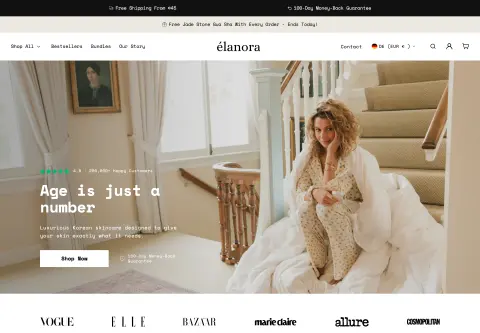
For Elanora Skin I built a gift engine for the cart. It adds free products as real lines with their own title, image and struck-through price and sends them in a single cart update so the cart stays fast. The store sells in 15 markets and two languages, and the promotion logic follows market and language. More in the project. For your store a standard feature may be entirely enough; custom logic only pays off when the flow would otherwise be too awkward for customers.
How to test the promotion
- A cart just below and just above the threshold.
- Gift added before and after the main product.
- Remove the main product again: what happens to the gift?
- Combination with a discount code and free shipping (see setting up shipping).
- Every market and language you serve (Shopify Markets).
- Smartphone and checkout up to the order summary.
- Gift sold out.
When a developer helps
For a gift the customer adds themselves you do not need one. Help is worthwhile when the gift should appear automatically, when promotions differ by market or language, or when several promotions have to work together. How a theme is adapted cleanly is in Customizing a Shopify theme. Apps and code belong in the ongoing upkeep later, see Shopify maintenance.
Frequently asked questions
Can Shopify put the gift into the cart automatically? According to the help not with Buy X get Y: customers have to add all items themselves. That takes an app or custom development.
Can I offer a gift above an order value without a code? Yes, as an automatic discount with a minimum purchase amount, if the customer adds the gift themselves.
Do shipping and taxes count towards the minimum order value? No, according to the help only product prices count.
What does a custom solution cost? That depends on the requirements. I do not name amounts here.
What about your store?
Send me your store’s address for the free store check. I look at what is visible from the outside, such as load time, apps in the source code and how pages are built, and tell you what stands out. I only work with publicly visible data, without access to your account. What else I do for stores is under Services and Store rebuild and redesign.
Further reading: Customizing the Shopify checkout · Creating Shopify bundles · Setting up Shopify subscriptions · Discount code or automatic discount in Shopify
Kiril Karatitsyn, Shopify developer in Germany